From
Bill to

Description

Price

$

Qty

Amount

$0.00

Subtotal$0.00
Invoice Total$0.00
Balance Due$0.00

Notes

Payment instructions, terms, thank-you notes.

Attachments

Photos and PDFs your client can open from the shared invoice. Not printed on the PDF.

    Free Invoice Generator

    How to write an invoice

    Here's the simplest way to do it. Use our free generator, and then fill in the sections outlined below.

    1. 1

      Add the sender and receiver's information.

      Business or names, address, phone, and email for both the sender and receiver of the invoice. Upload your logo if you have one; it makes the invoice look more professional.

    2. 2

      Add your items.

      One item per line; a product, service, or hour worked, with a quantity and a price. It is best to be clear about each item added to the invoice.

    3. 3

      Set your invoice number, dates, and terms.

      Use our default, or pick an invoice number, then set the invoice and due date. Finally, set the payment terms. Pro tip: always include clear payment instructions.

    4. 4

      Download or send it.

      Save the PDF or send it to the customer. That is the whole job. You can do it on a laptop at the kitchen table or on your phone in the truck between calls.
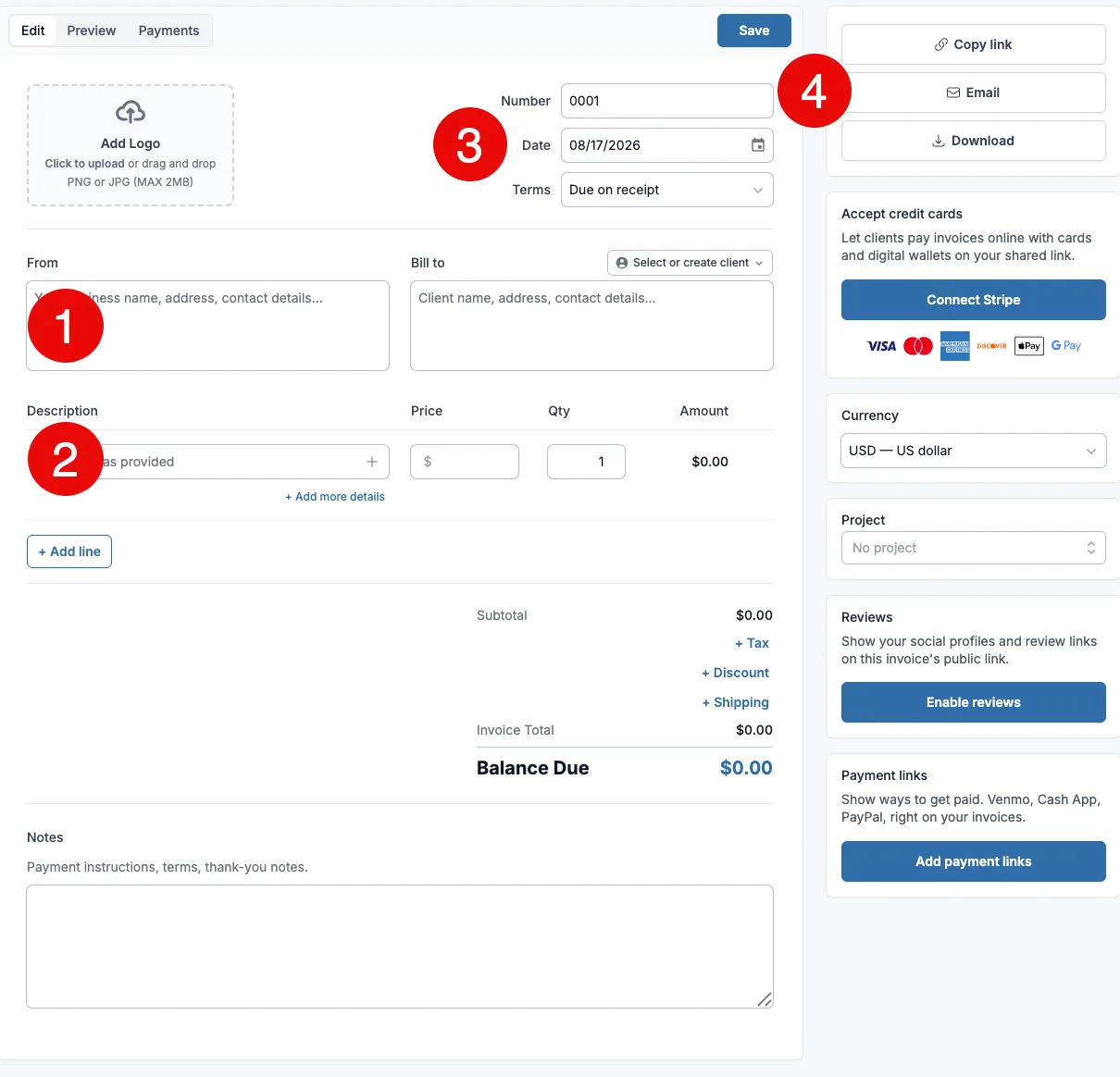
    The free invoice generator's editor with the four steps numbered: add sender details, add line items, set the invoice number and dates, then download or send

    What to include on an invoice

    Every invoice should include at least seven things. Completeness of each of the following items not only helps your customer understand what they are paying for, but also how and when to pay.
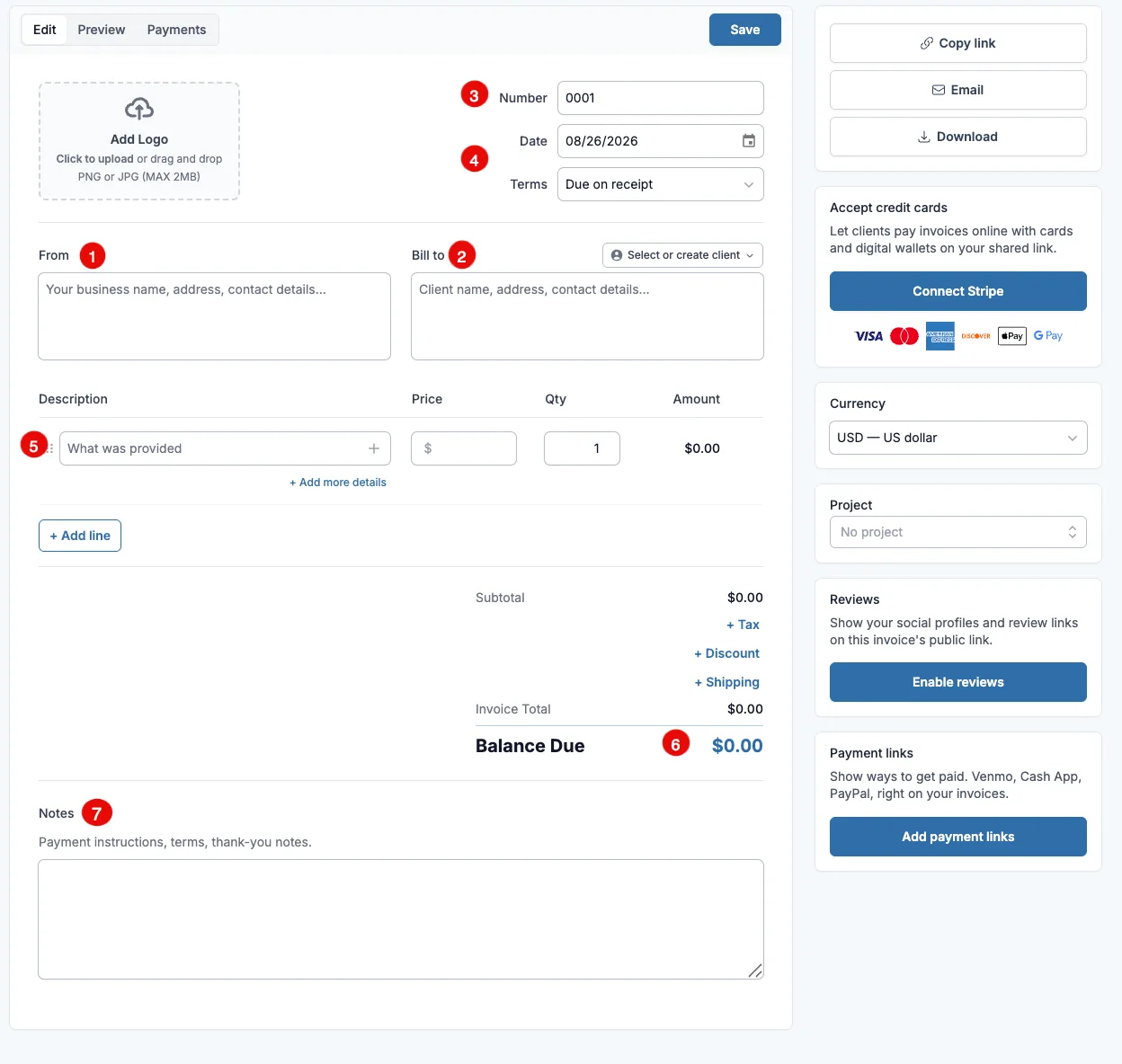
    1. Your business details: Name, address, phone, email, and your logo
    2. Your customer's details: Who's being billed, and where it's going
    3. An invoice number: Unique to each one, so you can both refer to it later
    4. Two dates: The day you issued it, and the day payment is due
    5. A line-item list: What you did, how much of it, and what each part costs
    6. The total owed: Subtotal, then tax, discount or shipping, then the final figure
    7. Payment terms and methods: When you want payment, and how they can pay you
    An invoice in the generator with its seven required parts numbered: sender details, customer details, invoice number, dates and terms, line items, the total owed, and payment notes

    It's best practice to include clear instructions on how your customer can pay you, often in the notes section. You can significantly improve your payment times by clearly outlining how and when the customer should pay. It's also best practice to tell your customer your preferred payment method. For example, if you want customers to pay via Zelle or Venmo, include your handles in the invoice notes and tell them to pay you at your payment address. If you prefer to be paid by check, tell the customer where to mail it.

    That's it. You don't need an accounting degree for this, and the wording doesn't have to be perfect. It has to be clear.

    How to send an invoice

    How you send your invoice matters. There are three common ways to send an invoice.

    1. Email: the modern, professional default way to send an invoice. It's fast and easy to deliver and can include links to electronic payment methods, which make it easier for the customer to pay.
    2. Text (SMS) message: the quickest, but a more casual way to send invoices. Text messages are best for invoices you want paid immediately, often while you're still on the job with the customer.
    3. Mail: the most traditional way to send an invoice, and still often the best for business-to-business services where the payor of the invoice might be a department, and not an individual.

    Choosing the right delivery method is important because an invoice is more likely to be paid quickly when it is sent in a way the customer regularly checks and is therefore likely to see:

    • Physical mail: approximately 61–65% opened and 76–77% at least viewed [1]
    • SMS: open rates cannot be directly measured; the often-cited 98% figure is an estimated visibility rate [2]
    • Email: approximately 35–36% average reported open rate, with privacy-related measurement limitations [3]

    Invoice format

    The invoice format also matters. There are a few different formats to choose from, each with pros, cons, and best use cases.

    1. Physical paper: paper invoices are the preferred format for in-person or mailed invoices. Handing the invoice to the customer in person is a tactile, tangible way to communicate the work completed and the payment process. Printing an invoice is also required when mailing an invoice to a customer.
    2. Electronic document: sending an electronic copy of the invoice means selecting from three primary formats:
      • PDF: the best way to send an electronic invoice. PDFs let users open an invoice on a laptop or mobile device while maintaining the formatting you expect. PDFs also aren't easily or accidentally edited, which prevents potential issues.
      • DOCX (Microsoft Word or Google Docs): Word or Google Docs invoices are great for creating one-off invoices or invoice templates, but sending an invoice to a customer in DOCX format is not best practice. DOCX files require the user to use software to open them, and then also can be edited once opened.
      • XLSX (Microsoft Excel or Google Sheets): spreadsheets are also great for one-off invoicing but again require the user to use software to view them, and once opened, the invoice can be edited.
    3. Online links: invoice links are links to viewable invoices online. They can include additional information or options that physical and electronic documents often can't, such as buttons to collect payment immediately or download the invoice as a PDF.

    Why an online invoice generator?

    Our invoice generator beats using Microsoft Word or Excel, Google Docs, and often even QuickBooks or other accounting software.

    Our app makes it easy to fill out the invoice and save fields such as your business name and contact information, and logos to make future invoicing faster. It also lets you track payment statuses and stay organized without learning complicated accounting software.

    Simply add a new invoice each time you need to invoice a customer, and quickly see it in a table to visually see who's paid and who hasn't.

    Additionally, our invoice generator lets you deliver an invoice to the customer via email or an invoice link with no other special software or skills required. We automatically attach the invoice as a PDF (the preferred format) to your email, and include the link to the online invoice, which can include payment links, if you choose to set up electronic payments.

    Our invoice generator offers

    • Free invoice creation - no account required
    • Automatic calculations of totals, tax, and discounts
    • Professional PDF downloads and templates
    • Email delivery
    • Shareable invoice links
    • Saved businesses, customers, items
    • Payment status tracking
    • Online payment collection
    • Mobile apps for invoicing on the go

    Invoice payment

    The whole point of an invoice is to get paid. It's best practice to provide clear instructions on how you'd like to be paid, and where the customer can make the payment.

    1. Cash or check (manual payments): manual payments can be accepted in person via cash or check. If you are mailing a physical invoice to the customer, a check is usually the default method of payment. When mailing an invoice to the customer, include the address where you want to receive the payment on your invoice. Failing to outline this can cause payment delays. Check payments usually mean the customer needs to mail a check, or hand you a check in person, after which you need to deposit the check. It often then takes 3–7 business days for the money to transfer to your account.
    2. Credit card: credit card payments offer the customer the convenience of paying immediately, which can result in faster invoice payments. Invoice Maker allows you to collect credit card payments for your invoices the same day. We use Stripe payments, which let you create your own account to collect payments. Credit card payments are managed by a third-party facilitator and, as a result, do have processing fees and can have settlement times, meaning it may take 1–3 days for the payment to show up in your bank account.
    3. Digital wallets: such as Zelle, Venmo, Cash App, Apple Pay, Google Pay, PayPal, and others allow customers to pay invoices through a digital wallet immediately. These methods often provide same-day settlement, meaning the money is in your account immediately, and have lower fees. However, digital wallets tend to have limits.
    4. ACH: or bank-to-bank payments are low-fee payments made directly from the customer's bank account to you electronically. This is generally faster than a check and has lower fees than a credit card.

    A U.S.-focused comparison of common invoice payment methods

    Payment methodTypical timingIllustrative seller fee*U.S. statisticBest fit and considerations
    ACH bank transferSame day to two banking days. About 80% of ACH volume settles within one banking day or less. [4]Stripe example: 0.8% per transaction, capped at $5. [5]The ACH Network processed 35.2 billion payments worth $93 trillion in 2025, including 8.1 billion B2B payments. [6]Often economical for large or recurring invoices. Bank details must be connected or provided, and payments can fail for insufficient funds.
    Cash or checkCash is immediate once received. For an in-person check deposit, the first $225 is generally available the next business day; larger deposits may be held longer. [7]Usually no percentage fee, but mailing, deposit, handling, reconciliation and returned-check costs may apply.Cash represented about 14% of U.S. consumer payments in 2024; 70% of cash payments were for less than $25. [8]Cash requires physical exchange and careful recordkeeping. Checks can be mailed, lost, delayed, or returned for insufficient funds.
    Credit cardAuthorization is normally immediate; the processor's payout to the seller commonly takes additional business days.Stripe example: 2.9% + 30¢ for a successful domestic online card transaction. [9]Credit cards accounted for 35% of all U.S. consumer payments in 2024. [8]Convenient for remote payment and provides prompt confirmation. Fees are generally higher than ACH, and chargebacks are possible.
    Digital walletsCustomer authorization is normally immediate; seller payout usually follows the underlying card processor's schedule.Stripe example: 2.9% + 30¢ for domestic online card and wallet payments; no additional Apple Pay fee. [9][10]In 2024, 11% of in-person, non-bill payments were made with a mobile phone. Mobile-phone payment use has more than doubled across all age groups since 2020. [8]Saved details and biometric authentication can shorten checkout. Most wallets use an underlying credit or debit card rather than a separate payment rail.

    * Fees are provider examples, not industry-wide averages. Actual costs and payout times depend on the processor, account agreement, transaction type, and seller risk profile.

    Our invoice generator lets you add any payment option to your invoice, so you can choose the method that best fits your needs.
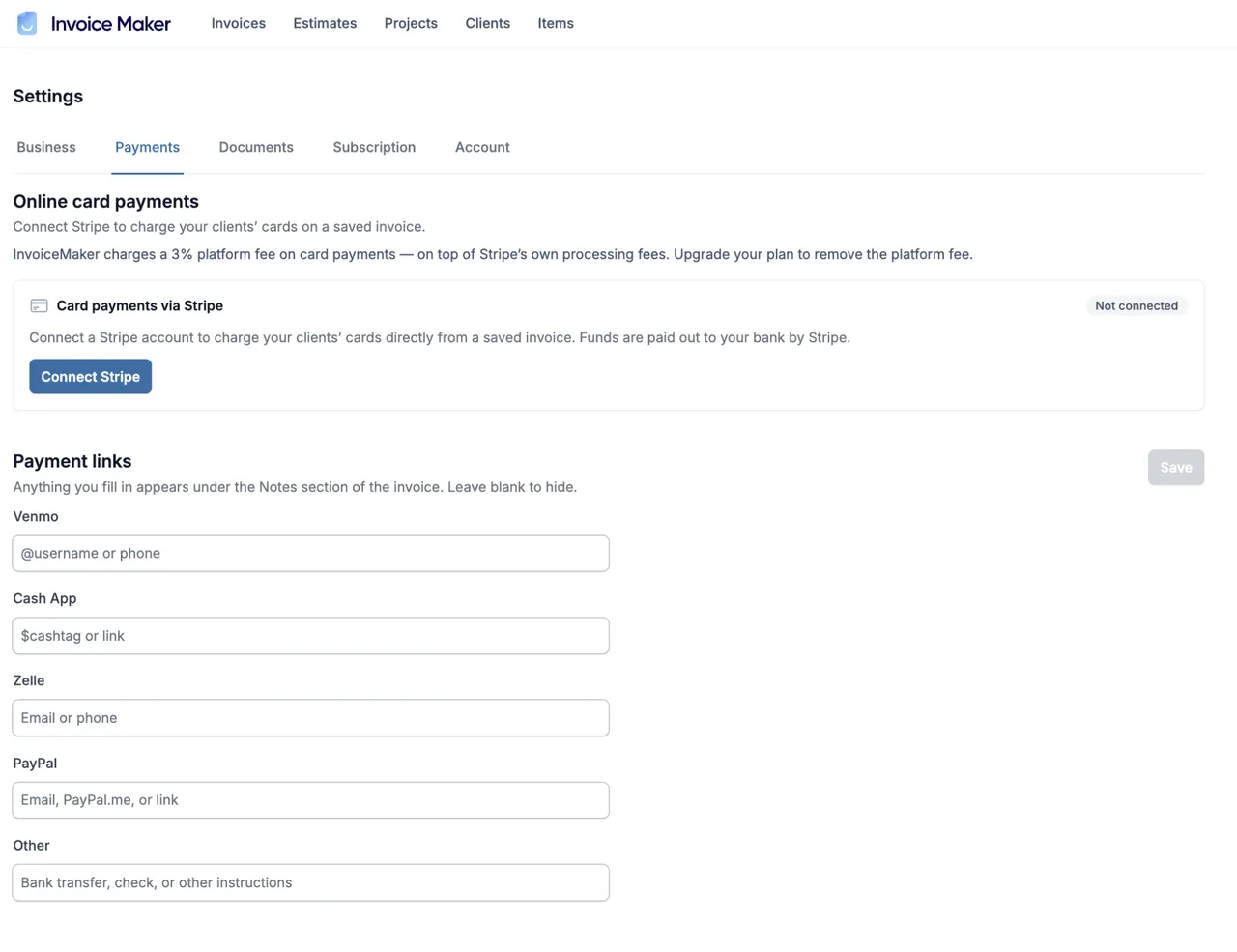
    Invoice Maker's payment settings: online card payments via Stripe plus payment links for Venmo, Cash App, Zelle and PayPal

    Who should use our invoice generator

    Invoice Maker's invoice generator is perfect for many types of businesses including:

    • Freelancers and creatives: writers, designers, photographers and videographers
    • Professional services: accountants, architects, attorneys and marketing consultants
    • Construction and trades: electricians, plumbers, HVAC technicians and contractors
    • Home and local services: cleaners, landscapers, handymen and repair technicians
    • Education, fitness and wellness: tutors, coaches, trainers and therapists
    • Real estate, transportation and events: agents, property managers, drivers, caterers and event professionals

    Whether you charge by the hour, project, appointment, milestone, unit, or recurring billing period, you can customize an invoice to reflect the services you provided and the way your business operates.

    Invoice generator FAQ

    Is there a way to create invoices for free?

    Yes. This invoice generator is free to use. Build the invoice, download the PDF, send it to your customer, pay nothing. Paid plans add extras like saved customers, recurring invoices, and card payments.

    Do I need an account to use the invoice generator?

    No. You can generate invoices without an account. However, to save and track invoices, you should create a free account to keep organized.

    Is Google invoice free?

    Google doesn't make a dedicated invoicing tool. People usually mean the free invoice template in Google Docs or Sheets. Those work, but you still have to handle numbering, totals, and PDF export. A generator does all three for you.

    Can ChatGPT generate an invoice?

    It can generate an invoice, but it won't calculate your tax reliably, keep your invoice numbers in order, produce a properly formatted PDF, or take a payment. For an invoice you're actually sending to a customer, use a tool built for the job.

    How do I generate my own invoice?

    Use our free invoice generator at https://invoicemaker.com/invoice-generator/

    What's the difference between an invoice and a receipt?

    An invoice asks for money, you send it before you have been paid. A receipt confirms the money arrived, and you send it after. Plenty of jobs need both.

    Can I make invoices on my phone?

    Yes. The generator works in any mobile browser, and the Invoice Maker app lets you build and send invoices from the job site.

    What should I do if an invoice doesn't get paid?

    Send a reminder with the original invoice attached. Most non-payment invoices are a result of an oversight, or missed invoice.